6 min read

How Hospital Foundations Can Eliminate Manual Donor Data Workflows

The Automation Gap in Nonprofits

Every day, hospital foundation teams balance urgent donor requests, campaign deadlines, and compliance requirements while the systems meant to support them create extra work. Staff find themselves chasing down missing records, manually exporting data, and cross-checking spreadsheets. Over time, these inefficiencies can erode donor trust, compromise reporting accuracy, and make it harder to achieve fundraising goals.

Many organizations have already invested in respected platforms like Luminate Online and Raiser’s Edge NXT. Yet instead of delivering a unified view of donor data, the connection between them often feels pieced together, incomplete, and dependent on staff hours that could be better spent on mission-driven work.

Charity Automator Data Flow removes these barriers. It delivers accurate, timely data across platforms so leadership teams can plan with confidence, fundraisers can act quickly, and operations teams can focus on strategic priorities.

For hospital foundations evaluating Omatic or another integration approach, the key decision is how much spreadsheet handling, transaction review, exception management, and technical knowledge will remain with their internal team.

What Is the Charity Automator Data Flow?

Charity Automator Data Flow is the controlled automation layer between your fundraising platforms and your CRM. It collects incoming transactions, matches them to existing records, applies your coding and business rules, validates the results, and moves the data on an agreed schedule. Transactions that require attention are clearly identified and recoverable, while source IDs, batch information and processing history support reconciliation and auditability. The result is less spreadsheet handling, more consistent revenue coding, more current CRM data and fewer unexplained differences between systems.

For hospital foundations, this creates a consistent path for moving donations, constituent information, campaign data, designations, consent information, event registrations, and other fundraising transactions into systems such as Raiser’s Edge NXT.

Before and After: How Hospital Foundation Transactions Reach the CRM

A manual workflow often looks simple when described as “export, prepare and import.” In practice, staff make decisions at every stage, frequently using spreadsheets, lookup tables, saved import profiles and institutional knowledge.

Workflow stage Before Data Flow With Data Flow
Collect transactions Staff export files or retrieve data from online giving, event, telemarketing and other fundraising platforms. Data Flow collects incoming transactions from connected APIs and approved files on an agreed schedule.
Prepare data Staff rename fields, normalize values, manipulate spreadsheets and apply default codes. Data Flow standardizes incoming data according to the foundation’s approved requirements.
Match constituents Staff search the CRM and decide whether to update an existing record or create a new one. Data Flow compares incoming information with existing CRM records using approved matching rules.
Apply coding Staff use lookup tables or institutional knowledge to assign campaign, fund, appeal, package and designation values. Data Flow applies the foundation’s coding and business rules consistently.
Validate Staff review the file or import results before the transactions can proceed. Data Flow validates the results and separates transactions that meet the approved requirements from those requiring attention.
Manage exceptions Staff correct files, investigate errors and rerun imports. Some transactions may delay the entire batch. Transactions requiring attention are clearly identified and recoverable, while eligible transactions continue.
Reconcile Finance and database staff compare source files, payment totals, CRM batches and spreadsheets. Source IDs, batch information and processing history support reconciliation and auditability.


How Valid Transactions and Exceptions Move

Data Flow collects incoming transactions, matches them to existing CRM records, applies the foundation’s coding and business rules, validates the results, and moves eligible data on an agreed schedule.

Valid transactions continue through the automated workflow. Possible constituent matches, missing required values, invalid coding combinations and technical failures are clearly identified for attention. After an issue is corrected, the transaction can be recovered without reprocessing the entire transaction population.

Source IDs, batch information and processing history help Finance, Development and data teams trace transactions from the original fundraising platform to the CRM and investigate differences between systems.

For example, Data Flow can use approved CRM information to determine the appropriate campaign, fund or appeal for a gift. If a donor resembles more than one existing constituent, the transaction can be identified as a possible match instead of being automatically attached to the wrong record.

How Data Flow Compares With Other Tools

Some integration platforms give nonprofit teams tools to configure mappings, operate workflows and manage exceptions internally. Data Flow is designed for organizations that want a controlled automation layer with less day-to-day operation by their staff.

SimpliPhi manages the technical configuration, monitoring, maintenance and recovery. The foundation defines and approves its business requirements, while eligible transactions move automatically and records requiring attention are clearly identified.

For a detailed comparison, read Exploring an Omatic Alternative: What Nonprofits Should Consider About Data Integration.

“With Data Flow, you don’t need to manage another tool. You don’t even need to touch it. Your data is in Raiser’s Edge NXT when you arrive in the morning.” — Lea Hardcastle, Director of Professional Services at SimpliPhi
infografics with benefits of Data Flow Charity Automator

Hospital Foundation Use Case

One client using RELO was manually reconciling hundreds of holiday donations. As the Fall Campaign progressed, the workload became unmanageable. Their database administrator was spending full days matching individual gifts.

After switching to Data Flow, more than 600 donations were processed overnight.

“They called us Tuesday morning and said, ‘Turn it on. We can’t do this manually anymore.’” — Christina Giffen, Project Coordinator at SimpliPhi

Today, this organization also imports event data, telemarketing responses, and race registrations through the same automated process.

Hospital foundations and large nonprofits choose Data Flow for its reliability, scalability, and simplicity. It has supported organizations through high-growth periods, seasonal campaign peaks, and times of significant staffing changes.

Christina Giffen says: “During COVID, when staff turnover was high, automated solutions like Data Flow became vital for business continuity.”

Some staff are hesitant to automate, preferring to review every record before it enters the database. However, as new professionals join the sector, openness to automation increases. Strategic leaders see pre-validation as unnecessary. They want to manage data in the system, not before it enters the system.

Flexibility For Any Integration

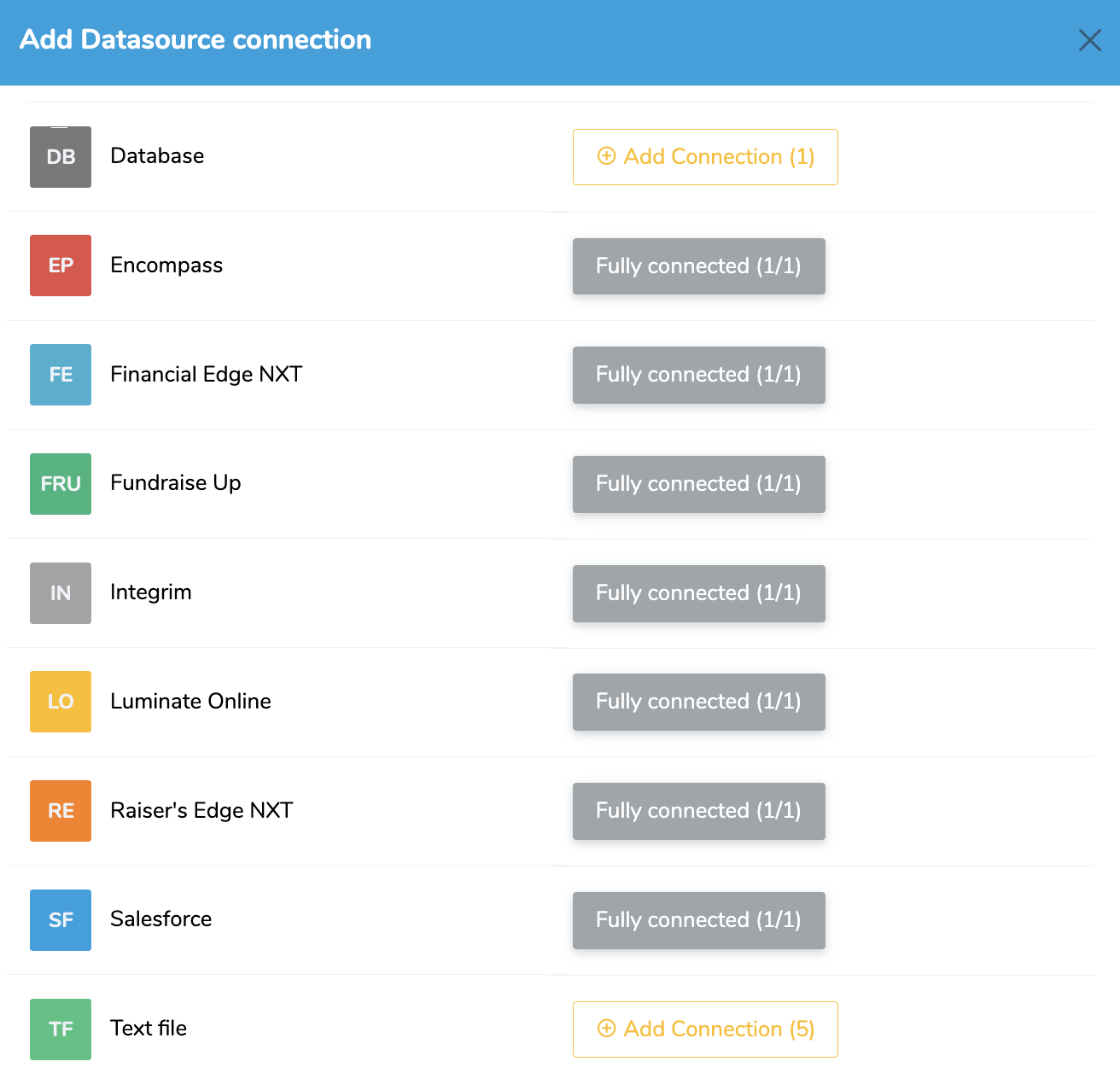
While connecting Luminate Online to Raiser’s Edge NXT is the most common starting point, Charity Automator Data Flow supports a wide range of platforms used by fundraising, marketing, and advancement teams. The system is designed to meet each nonprofit where they are, whether that means starting with CSV exports or leveraging modern APIs.

The system is scalable for high-volume environments and can also handle smaller imports: ideal for organizations phasing out legacy tools.

🔹 API-Based Integrations

For platforms with modern APIs, we run automated, bi-directional syncs on your schedule — no manual exports or middleware tools required.

  • Luminate Online (LO). Email engagement, donation forms, constituent data
  • iModules / Encompass (IM). Higher-ed focused engagement and alumni platforms

🔹 Conversion Integrations

We help nonprofits migrate data out of legacy or custom CRMs into modern systems — cleanly, securely, and with historical integrity.

  • ProDon (PD). Canadian CRM platform (conversion projects)
  • DonorPerfect (DP). Full donor, campaign, and gift migration
  • Salesforce (SF). Constituent and donation data to/from Salesforce
  • Advance (AWA) (Ellucian). Higher education advancement platform

These are often one-time or phased migrations into Raiser’s Edge NXT, Data Warehouse, or another core system.

If your system does not offer a modern API or we don't have a direct integration with it, we do support importing text files that you export from any system.

🔹 Text File Integrations

These systems export structured files (CSV, TXT, etc.) that we import, transform, and map automatically into your destination platform.

  • Fundraise Up (FRU). Donation and campaign data (file export format)
  • Race Roster (RR). For participant and donor data from peer-to-peer and race events
  • CrowdChange (CC). Event fundraising and participant data
  • Ascend (AS). Event registration, ticketing, donor gifts
  • Engage (ENG). Peer-to-peer campaigns and online forms
  • Public Outreach (PO). Telemarketing call data and pledges
  • Canada Helps (CH). General donation and campaign transactions
  • Any Custom File. For legacy systems or unsupported platforms

We map, clean, and import these files directly into RE NXT, FE NXT, Salesforce, or your Data Warehouse.

🔹 Web Form & Front-End Tools

  • Gravity Forms (WP_GF) (WordPress). Donation forms, event sign-ups, contact updates

🛠 Don't See Your System Listed?

Let us know! We support custom file formats and APIs. If your system can export data or provide access via API, we can likely integrate it.

🧠 Data Warehouse Integrations

SimpliPhi’s Charity Automator Data Warehouse can ingest and harmonize data from all your tools — automatically and on schedule.This central source powers reporting across campaigns, departments, and tools, eliminating the need for spreadsheet stitching.

  • Raiser’s Edge NXT (RE)
    Imports donation, constituent, and gift coding data to support campaign analysis and segmentation across all channels.
  • Financial Edge NXT (FE)
    Syncs financial transaction records for accurate reconciliation and integrated financial reporting.
  • Luminate Online (LO)
    Brings in email performance, donation form submissions, and engagement data for full-funnel visibility.
  • Salesforce (SF)
    Connects nonprofit-specific Salesforce instances to consolidate supporter data alongside other fundraising systems.
  • Any Text File
    Supports flexible ingestion of data exports from legacy platforms or tools without native integrations. Just upload and we’ll take care of the rest.

Setup and Ongoing Support

Even though Data Flow is powerful, setup is guided and straightforward. Most organizations do not require technical staff to be involved. SimpliPhi manages:

  • Initial discovery and mapping
  • Custom rule configuration
  • Testing and validation
  • Ongoing maintenance

Your team helps define the business requirements, reviews the mappings, validates the results and approves the workflow. SimpliPhi manages the technical configuration, monitoring, maintenance and recovery.

The Next Step for Hospital Foundations

Charity Automator Data Flow gives hospital foundations a controlled automation layer between their fundraising platforms and CRM. The result is less spreadsheet handling, more consistent revenue coding, more current CRM data and fewer unexplained differences between systems.

If your hospital foundation currently relies on Omatic, RELO, spreadsheets or recurring manual imports, SimpliPhi can review your workflow and create a personalized replacement plan. We will examine your systems, transaction volumes, matching requirements, coding rules, exceptions, reconciliation process and reporting schedule, then recommend a phased transition that protects campaign continuity.

Frequently Asked Questions (FAQ)

Is Charity Automator Data Flow an alternative to Omatic?

Yes. Data Flow is designed for nonprofits that need a controlled automation layer between fundraising platforms and their CRM. The right choice depends on your systems, transaction volume, business rules, exception-management requirements and how much integration expertise you want to maintain internally.

How does Data Flow match incoming transactions to constituents?

Data Flow compares incoming information with existing CRM records using matching rules approved by the organization. Transactions with clear matches continue, while possible matches are identified for review to reduce the risk of creating unnecessary duplicates or linking a gift to the wrong record.

What happens when a transaction requires attention?

The transaction is clearly identified and remains recoverable. Eligible transactions can continue through the workflow while the exception is investigated and corrected.

When does the data become available for reporting?

Successfully processed transactions are available in the CRM after the agreed Data Flow schedule. Data Warehouse and BI reporting follow the relevant ingestion and dashboard-refresh schedules.

How does Data Flow support reconciliation?

Source IDs, batch information and processing history help teams trace transactions from the fundraising platform into the CRM and investigate missing records or differences between systems.

Does Data Flow eliminate manual work?

Data Flow reduces the need to manually collect, prepare, match, code and validate every transaction. Foundation staff remain involved when an exception requires an organizational decision, such as confirming donor intent or selecting the correct constituent.

A Data Team’s Checklist for Charity Automator Data Flow Updates in 2025

1 min read

A Data Team’s Checklist for Charity Automator Data Flow Updates in 2025

We created this checklist to help nonprofit data teams review recent Charity Automator Data Flow updates and confirm they are using all available...

Read More
Unlocking Potential: How Data Drives Transformative Change

2 min read

Unlocking Potential: How Data Drives Transformative Change

In today’s fast-paced world, data is everywhere. It’s easy to focus on flashy tools and quick fixes, but what truly makes an impact is the foundation...

Read More
Why Simplifying Data is Essential for Nonprofits ?

1 min read

Why Simplifying Data is Essential for Nonprofits ?

For many nonprofits, managing data is a daunting and time-consuming task. Information is often scattered across different tools, processes are overly...

Read More
How Roswell Park Alliance Foundation Automated 17,000+ Gifts during the peak season and Saved 30 Hours Per Month with Charity Automator Data Flow

3 min read

How Roswell Park Alliance Foundation Automated 17,000+ Gifts during the peak season and Saved 30 Hours Per Month with Charity Automator Data Flow

The Roswell Park Alliance Foundation is a not-for-profit organization that manages all donations made to Roswell Park Comprehensive Cancer Center....

Read More
Automate without losing human touch : the right way to use AI in Philantropy

2 min read

Automate without losing human touch : the right way to use AI in Philantropy

Technology is transforming how nonprofits engage with donors, manage fundraising, and measure impact. Automation tools, AI, and data-driven platforms...

Read More
Smart Cleanup for Raiser’s Edge NXT: Delete Data with Confidence

2 min read

Smart Cleanup for Raiser’s Edge NXT: Delete Data with Confidence

What This Feature Enables With field deletion in Data Flow, teams can: Remove custom fields added temporarily during multi-step integrations Delete...

Read More
5 Signs It’s Time to Optimize Your Nonprofit Operations

2 min read

5 Signs It’s Time to Optimize Your Nonprofit Operations

1. Data Silos Are Hindering Your Insights If your CRM, finance software, email tools, and fundraising platforms operate in isolation, your team...

Read More